Best Way to Download Instagram Photos in Full HD Quality
Learn the mechanics of Instagram photo quality and how to download high resolution pictures without compression loss or soft details.
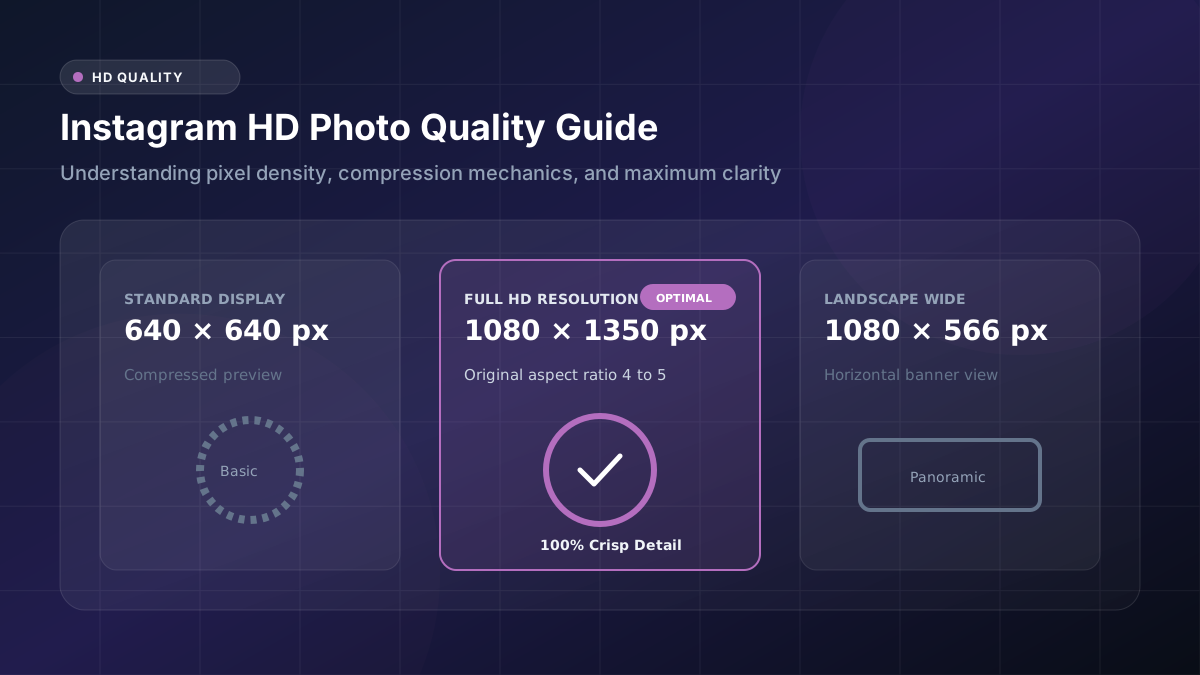
You spot a stunning photo on Instagram, save it excitedly, then open the file only to find it looking soft and washed out. That letdown happens to almost everyone at some point. Understanding what actually controls sharpness makes all the difference, and once you know the mechanics, how to download Instagram photos in HD stops feeling like guesswork and starts feeling like a repeatable process.
What Determines Instagram Photo Quality?
Instagram photo quality depends heavily on how the file gets processed once it reaches the platform’s servers. Pixel dimensions, color depth, and the compression algorithm applied during upload all interact to produce the final version everyone sees. Screen type matters too. A photo viewed on a small phone display might look perfectly crisp, yet the same file can reveal soft edges and muddy detail once stretched across a large desktop monitor, simply because larger screens expose flaws that smaller ones hide.
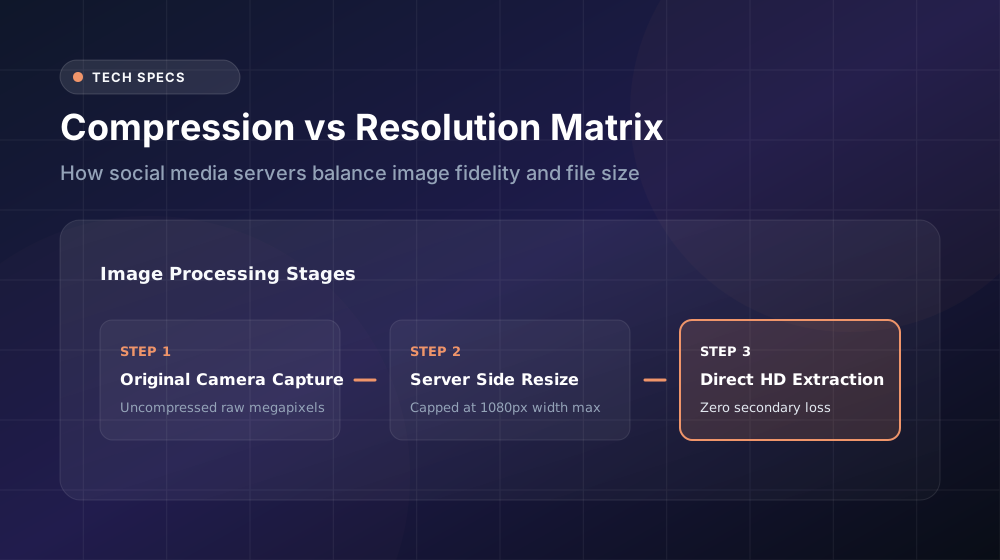
Why Downloaded Instagram Photos May Look Different
This processing happens because Instagram prioritizes speed over pixel-perfect accuracy. The platform serves images through a content delivery network built for efficiency, which means the version you’re downloading through an Instagram photo downloader reflects Instagram’s processed copy rather than the pristine file straight from the original photographer’s camera roll. Knowing this upfront helps set realistic expectations before you even begin the download process.
How to Download Instagram Photos in HD
Before confirming anything, look carefully for a quality selector. Many tools tuck this option away in a dropdown menu or small toggle switch, and skipping past it without noticing often results in an automatically compressed download instead of the sharper version you actually wanted. Selecting “HD,” “Original,” or “High Resolution,” whichever label your chosen Instagram HD downloader uses, makes a dramatic difference in how the final image holds up, especially if you plan on zooming in, printing, or editing it later.
How Instagram Compresses Uploaded Images
The platform does this at massive scale, processing millions of uploads daily, so speed and consistency take priority over preserving every last detail. JPG compression, the format Instagram relies on most heavily
Does the Original Resolution Matter?
It absolutely does, and this single factor probably influences your final download quality more than anything else on this list. Photos captured and uploaded at a higher original resolution carry more pixel information to begin with, meaning they have more room to absorb compression without falling apart visually.
How to Preserve Image Quality
Image quality preservation genuinely starts with the tool you choose, not just the settings you select within it. Some downloader websites apply an additional layer of their own compression on top of whatever Instagram already did, stacking losses and producing a noticeably worse result than necessary.
Testing a tool before relying on it regularly pays off here. Download a sample image, then zoom into fine details like text or small patterns to judge how much sharpness survived the process. Avoid taking screenshots as a shortcut, since screenshots capture whatever’s currently rendered on your screen, an already-compressed display version, and often crop edges unevenly in the process. A dedicated HD image downloader built specifically for pulling original files will almost always outperform the screenshot method, sometimes dramatically so.
JPG vs Other Image Formats
| Format | Compression Type | Typical File Size | Best Use Case |
|---|---|---|---|
| JPG image | Lossy | Small to medium | Everyday sharing, quick reposts |
| PNG | Lossless | Larger | Graphics, text overlays, transparency |
| WebP | Variable | Small | Fast-loading websites |
Most Instagram downloads arrive as Instagram JPG files, which strike a reasonable middle ground between manageable file size and acceptable visual quality for casual use. PNG files preserve considerably more detail and avoid the generational loss JPG compression introduces, but they take up noticeably more storage space, which matters if you’re downloading dozens or hundreds of images over time. WebP has grown more common recently thanks to its efficient balance of quality and size, though not every downloader tool supports converting into this newer format just yet.
How File Size Changes With Higher Quality
Choosing a higher-quality download inevitably means accepting a larger file size in return. A typical HD download might land somewhere between two and eight megabytes, depending on the original photo’s complexity, compared to well under one megabyte for a heavily compressed version of the same image.
For most casual purposes, this trade-off barely registers as an inconvenience. Modern phones and computers handle a few extra megabytes without any noticeable slowdown. However, if you’re planning to download dozens of images for a project, a portfolio, or a print run, that photo file size difference adds up quickly across your device’s available storage. Keeping an eye on your remaining space, or moving completed downloads to cloud storage periodically, helps you avoid running into capacity issues down the road.
How to Check the Resolution of a Downloaded Photo
As a general rule of thumb, anything measuring above 1080 pixels wide counts as reasonably solid quality for typical Instagram photo download purposes, suitable for sharing, moderate editing, or viewing on most screens. Numbers noticeably lower than that suggest compression happened somewhere along the way, whether during the original upload, the download process itself, or both. Comparing this figure against what you’d expect from the original post helps you evaluate whether your chosen downloader tool is actually delivering on its quality promises.
Conclusion
Chasing sharp, high resolution Instagram photos doesn’t require technical expertise, just a bit of awareness about where quality gets lost along the way. Choose a downloader that clearly offers quality options, always select the highest available setting, and skip the screenshot shortcut whenever possible. Put these habits into practice consistently, and your saved images will hold up beautifully, looking every bit as sharp as they did the moment they were first posted.